How to investigate technical SEO issues
Inspect status and indexability
Start with the URLs that matter to customers: key landing pages, product pages and representative templates. Record whether the goal is crawlability, indexing, content quality or page performance.
Use a fixed set of crawl settings and an explicit page limit. A crawl that stops early cannot establish that every page on the site is healthy.
Keep a dated record of the target, rendering choice and collection route. This makes a later comparison explainable instead of mixing results collected under different conditions.
Review the HTTP response before reading the page content. A redirect, error response or blocked request needs a different investigation from a successful HTML page.
Review internal links
Check robots meta tags and canonical URLs in the returned document. A noindex directive is intentional exclusion from search, while a canonical expresses a preferred URL; they solve different problems.
Inspect representative pages manually when a template generates the same problem across many URLs. Fixing the template can be more effective than editing each rendered page.
Group broken links by their referring page and target. Prioritize links that prevent users or crawlers reaching important content.
Compare internal destinations with the preferred URL set. Link directly to canonical pages rather than relying on a chain of redirects.
Check metadata and duplication
A missing page in a bounded crawl may be outside the crawl scope. Verify the URL independently before labeling it an orphan or a deleted page.
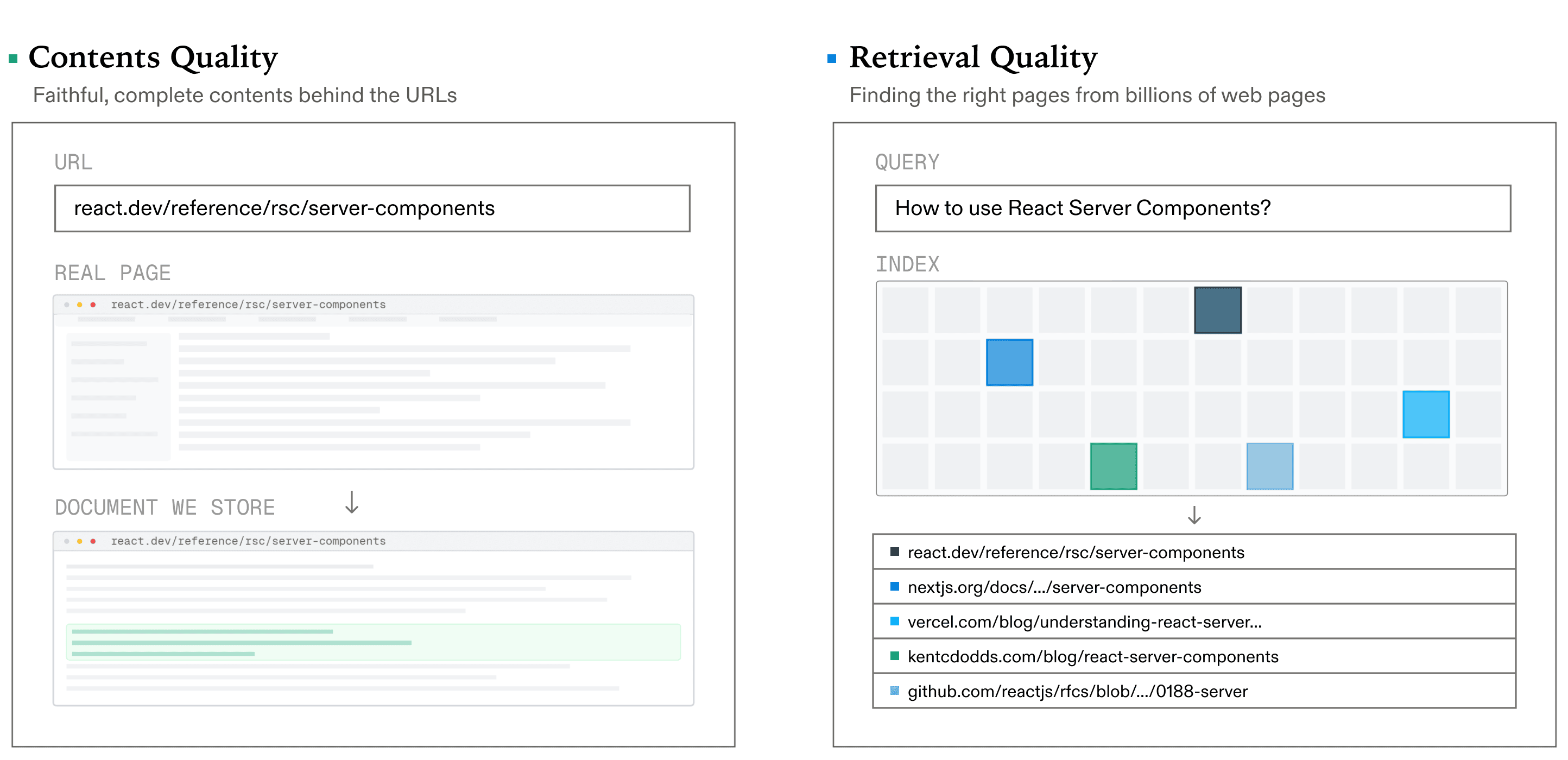
- On-Page quality - contents that correctly answer the query
- Combine On-Page API with complementary datasets when your question spans search visibility, demand, links, page health, or AI citations.
Choose rendering and performance tests
Prioritize and verify fixes
Look for titles and descriptions that accurately identify each page’s purpose. Repeating the same generic statement across every product does not help users distinguish them.
Compare duplicate candidates by their primary content and intent. Decide whether to consolidate them, redirect a retired route or create genuinely distinct information.
Use the same preferred URL in internal links, canonical tags and the sitemap. Conflicting signals make the intended URL harder to interpret.
Define the audit scope
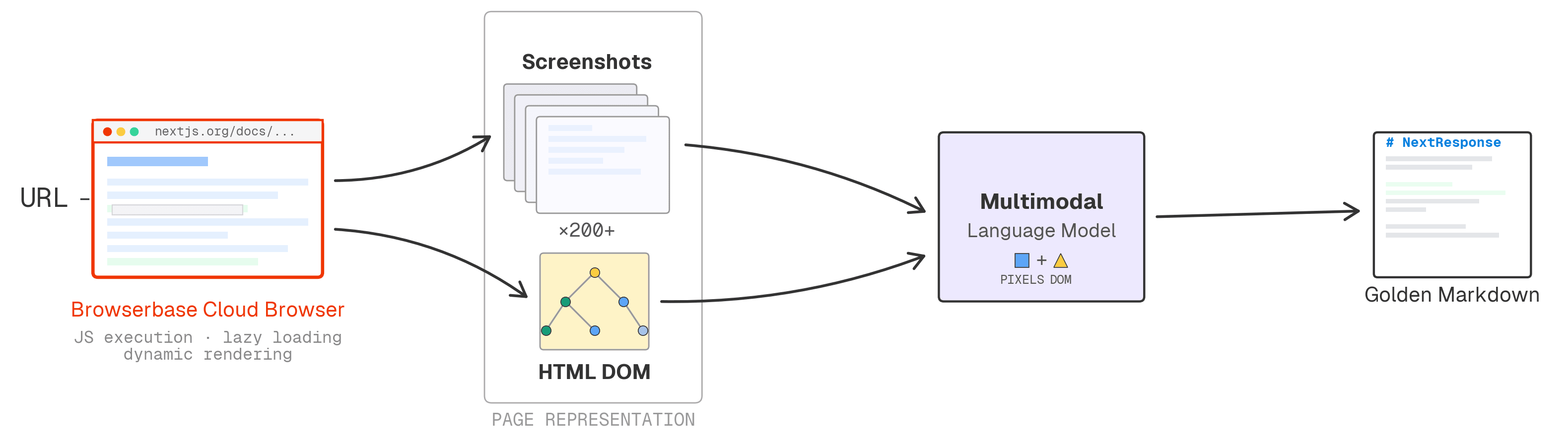
Start with the simplest collection that exposes the content you need. JavaScript-dependent templates may require a browser, but browser collection has different resource requirements.
- fetch correctly but corrupt formatting
- preserve structure perfectly while dropping half the page
Interpret Lighthouse as a lab run under specific conditions. Do not report its result as real-user Core Web Vitals without field measurements.
- Set the keyword, search engine, location, language and device. Preserve those settings with each observation so ranking comparisons describe the same audience and market.
- Research organic search, maps, news, images, shopping and other supported result types. Use item types to interpret the fields returned by each endpoint.
Inspect status and indexability
Check images, fonts and third-party resources when investigating load problems. Retest the same page under comparable conditions after changing a resource.
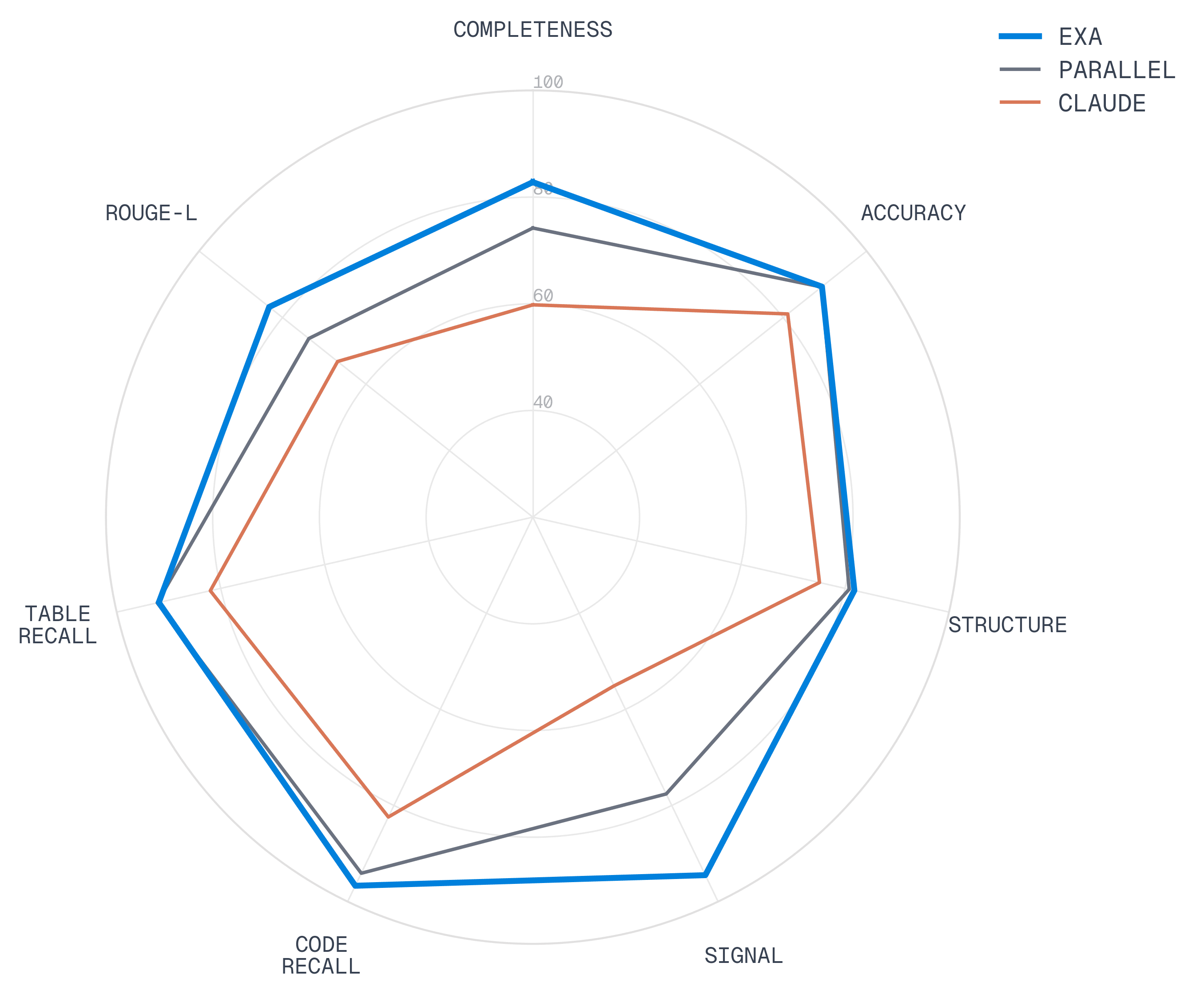
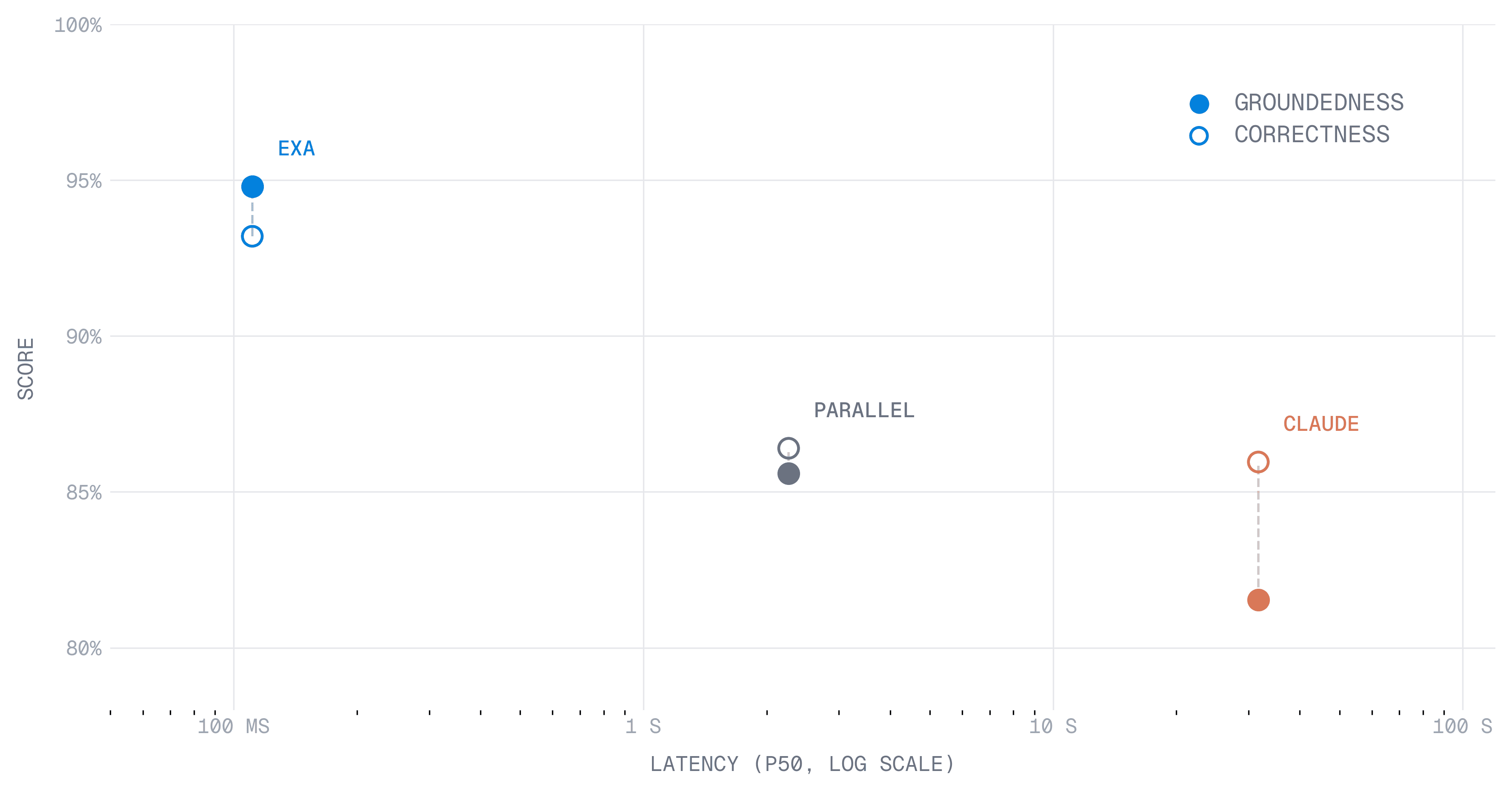
| Provider | Completeness | Signal | Structure | Accuracy | Code Recall | Table Recall | ROUGE-L |
|---|---|---|---|---|---|---|---|
| DataSEO | 82.8 | 94.5 | 81.8 | 89.3 | 96.7 | 91.9 | 83.2 |
| Example collection | 74.2 | 77.6 | 80.8 | 89.2 | 94.1 | 92.2 | 73.7 |
| Claude† | 59.8 | 55.1 | 75.1 | 81.1 | 82.4 | 82.0 | 66.8 |
For each finding, retain the affected URL, evidence, likely user impact and a concrete fix. Distinguish confirmed issues from questions that need further investigation.
Review internal links
Fix direct indexing and navigation failures before polishing minor metadata. Order the remaining work by business importance, impact and implementation effort.
Check metadata and duplication
Repeat the relevant checks after a fix and compare the evidence. A successful test proves the checked behavior; it does not guarantee a future search ranking.
Checklist: Start with the URLs that matter to customers: key landing pages, product pages and representative templates. Record whether the goal is crawlability, indexing, content quality or page performance.
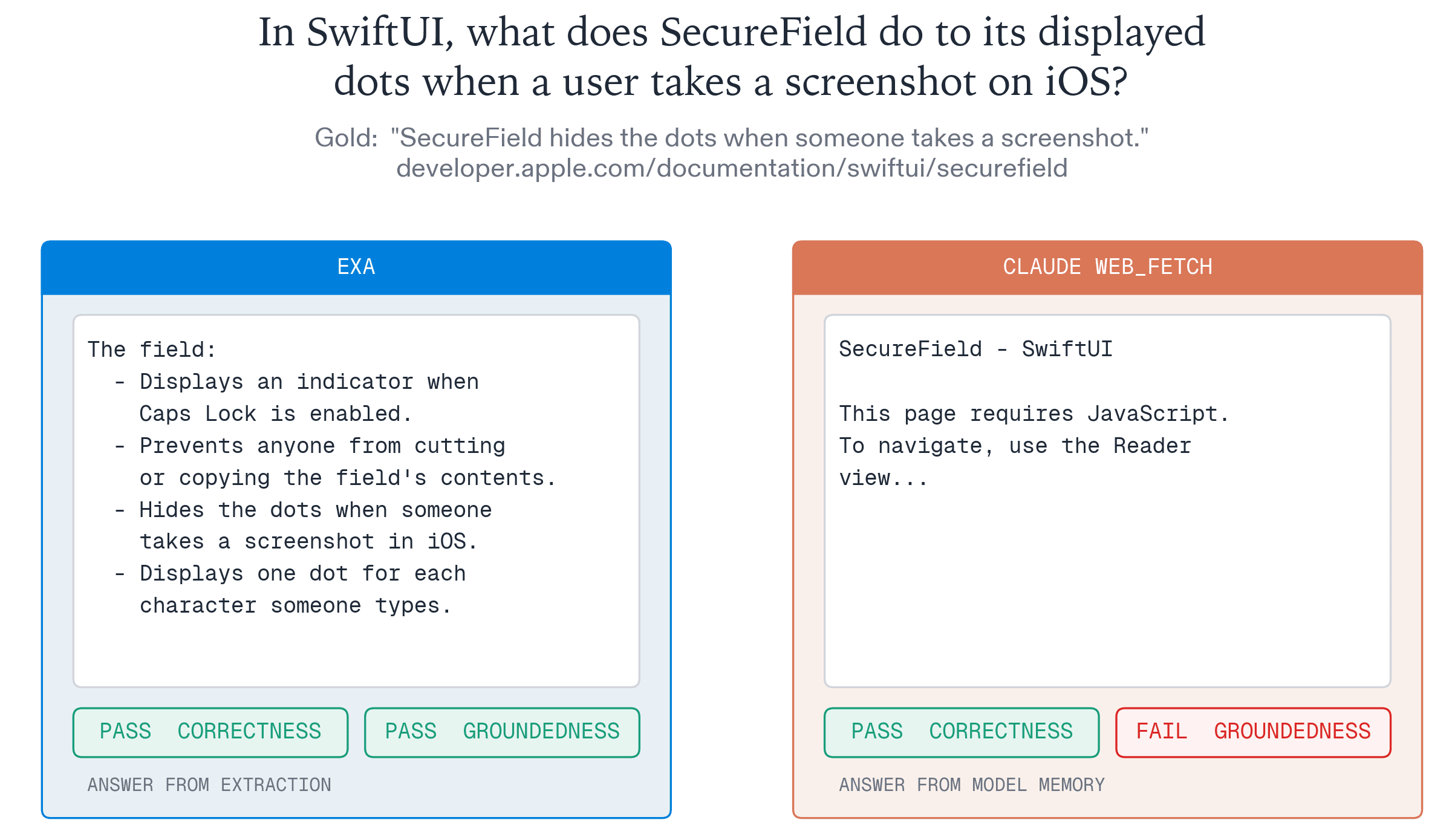
- Highlights were incorrect but the synthesis LLM returned the correct answer
- Highlights were correct but the synthesis LLM returned the incorrect answer
Checklist: Use a fixed set of crawl settings and an explicit page limit. A crawl that stops early cannot establish that every page on the site is healthy.
Checklist: Keep a dated record of the target, rendering choice and collection route. This makes a later comparison explainable instead of mixing results collected under different conditions.
- Start with the targets and markets you need to investigate. Keep the source and collection time with each On-Page API response.
- Combine On-Page API with complementary datasets when your question spans search visibility, demand, links, page health, or AI citations.
Choose rendering and performance tests
Checklist: Review the HTTP response before reading the page content. A redirect, error response or blocked request needs a different investigation from a successful HTML page.
Checklist: Check robots meta tags and canonical URLs in the returned document. A noindex directive is intentional exclusion from search, while a canonical expresses a preferred URL; they solve different problems.
Prioritize and verify fixes
Checklist: Inspect representative pages manually when a template generates the same problem across many URLs. Fixing the template can be more effective than editing each rendered page.
Checklist: Group broken links by their referring page and target. Prioritize links that prevent users or crawlers reaching important content.
Define the audit scope
Inspect status and indexability
Checklist: Compare internal destinations with the preferred URL set. Link directly to canonical pages rather than relying on a chain of redirects.
Checklist: A missing page in a bounded crawl may be outside the crawl scope. Verify the URL independently before labeling it an orphan or a deleted page.
Checklist: Look for titles and descriptions that accurately identify each page’s purpose. Repeating the same generic statement across every product does not help users distinguish them.
Review internal links
Checklist: Compare duplicate candidates by their primary content and intent. Decide whether to consolidate them, redirect a retired route or create genuinely distinct information.
Checklist: Use the same preferred URL in internal links, canonical tags and the sitemap. Conflicting signals make the intended URL harder to interpret.
Checklist: Start with the simplest collection that exposes the content you need. JavaScript-dependent templates may require a browser, but browser collection has different resource requirements.
- Group crawl issues by type and priority, then check affected URLs after a fix.
-
Set the keyword, search engine, location, language and device. Preserve those settings with each observation so ranking comparisons describe the same audience and market.
- Research organic search, maps, news, images, shopping and other supported result types. Use item types to interpret the fields returned by each endpoint.
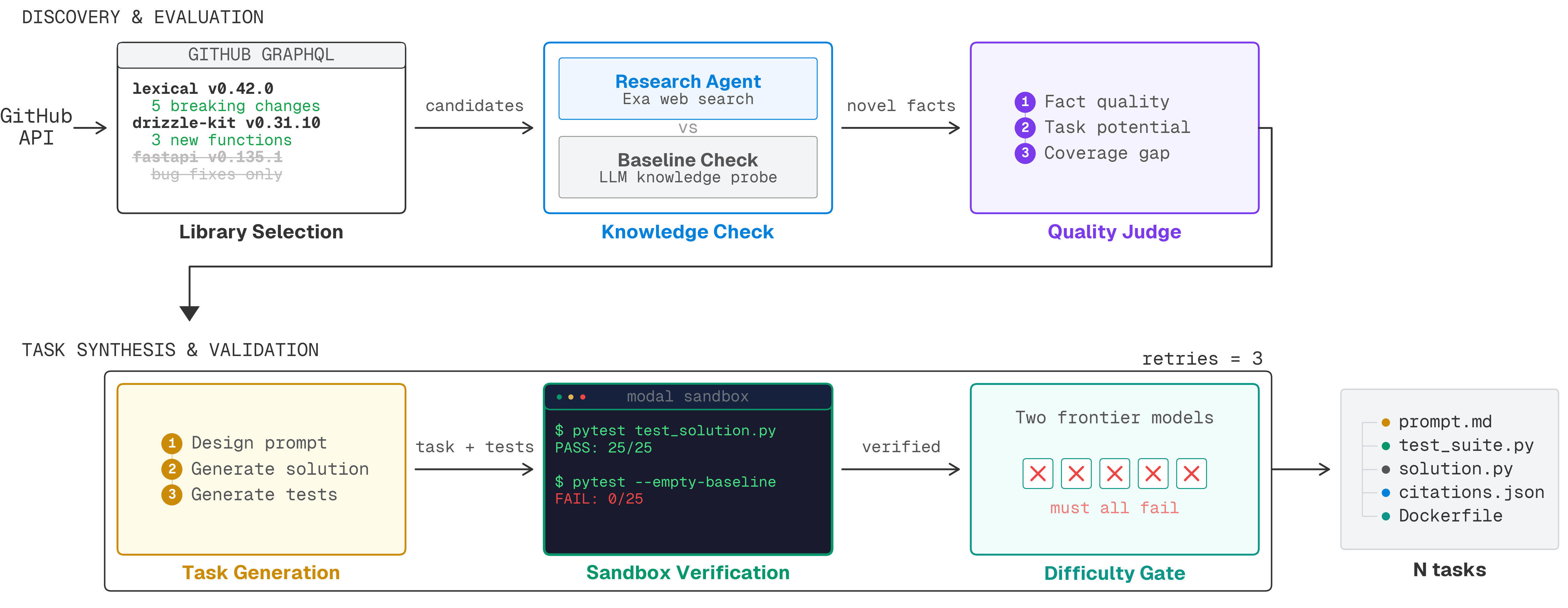
- Task generation: Generated a task prompt, solution, and test suite using the novel facts
- No. Choose rendering and audit options for the site you are checking. Additional processing can affect collection cost and speed.
- Start with the targets and markets you need to investigate. Keep the source and collection time with each On-Page API response.
Checklist: Interpret Lighthouse as a lab run under specific conditions. Do not report its result as real-user Core Web Vitals without field measurements.
Checklist: Check images, fonts and third-party resources when investigating load problems. Retest the same page under comparable conditions after changing a resource.
Check metadata and duplication
Checklist: For each finding, retain the affected URL, evidence, likely user impact and a concrete fix. Distinguish confirmed issues from questions that need further investigation.
Checklist: Fix direct indexing and navigation failures before polishing minor Explore On-Page API → by business importance, impact and implementation effort.
Checklist: Repeat the relevant checks after a fix and compare the evidence. A successful test proves the checked behavior; it does not guarantee a future search ranking.
See open roles-
1
.
In practice: Start with the URLs that matter to customers: key landing pages, product pages and representative templates. Record whether the goal is crawlability, indexing, content quality or page performance.
Define the audit scope
In practice: Use a fixed set of crawl settings and an explicit page limit. A crawl that stops early cannot establish that every page on the site is healthy.
Inspect status and indexability
In practice: Keep a dated record of the target, rendering choice and collection route. This makes a later comparison explainable instead of mixing results collected under different conditions.
Review internal links
In practice: Review the HTTP response before reading the page content. A redirect, error response or blocked request needs a different investigation from a successful HTML page.
Check metadata and duplication
In practice: Check robots meta tags and canonical URLs in the returned document. A noindex directive is intentional exclusion from search, while a canonical expresses a preferred URL; they solve different problems.